Maintenance & Cleaning
Garbage Disposal Reset Button: Location and How to Use It
Affiliate disclosure: some links on this page go to Amazon, and we may earn a commission if you buy through them. That never changes the repair advice below or the order we recommend the steps in. Details.
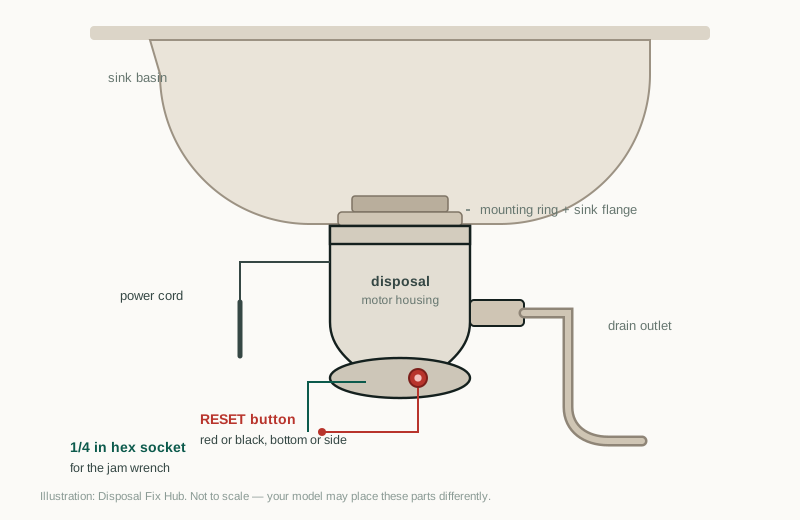
Homeowners usually find this button after the sink has been dead for an hour and a half. Knowing where it is before that happens turns a possible service call into a ten-second check.
What the button actually does
The reset is a thermal overload protector. It sits in the motor circuit and opens when the motor draws too much current or gets too hot. That protects the windings from burning up when the flywheel is stuck and the motor is straining against it.
It is not a fuse and not a circuit breaker. It is designed to be reset by hand once the cause is removed. Pressing it repeatedly without clearing the jam just trips it again, because the overload is doing its job.
Where to look, by unit family
Reach under the sink with a flashlight. The button is almost always on the bottom of the housing within a few inches of where the power cord enters. On a few models it is on the lower side rather than the true bottom.
| Unit family | Usual location | What to expect |
|---|---|---|
| InSinkErator Badger | Bottom of the housing, near the cord, often beside the hex socket | Red button, plainly visible |
| InSinkErator Evolution | Bottom, near the cord; sometimes tucked behind the sound shell or a small cap | Red button; may need a mirror or phone camera to see it |
| Waste King Legend | Bottom, close to the cord entry | Often black rather than red |
| Older or other brands | Lower side or rear of the housing | Some units have no external reset at all |
Locations vary by model year, so treat the table as a starting point rather than a guarantee. If you cannot see the bottom clearly, take a photo with your phone and look at it on the screen; the cabinet is dark and the button is small.
What it looks like when it has tripped
A set button sits flush with the housing or slightly recessed. A tripped button stands proud, sometimes by a couple of millimeters, and may feel loose under your thumb. Some units mold the word RESET into the plastic next to it.
Color is not a reliable indicator of state. Red and black buttons both appear on working units, and both can be tripped. Go by position, not color.
Safety first
You are reaching into a cabinet that contains live wiring, a wet floor, and a motor that can start the moment the switch is flipped. Dry your hands, use a flashlight instead of putting your face against the cabinet, and never press the button with a screwdriver or knife. If the cord, plug, or outlet looks scorched or feels hot, stop and kill the breaker.
How to press it correctly
Use your thumb. Press straight in, firmly, until you feel or hear a click, then let go. One press is enough. Do not hold it in — holding the button down does not bypass anything, and it can damage the mechanism.
If the button will not stay in, the overload is opening again as soon as the circuit is complete. That means the motor is still seeing a jam or a fault. Go back to the chamber and the wrench before you press it a third time. The unjamming procedure covers that sequence.
Never use a metal tool to press it. A screwdriver can crack the housing, slip into the motor compartment, or push the button past its stop so it never resets again.
Why it pops back out
Four things cause a trip, and they are worth separating because only one of them is fixed by pressing the button.
- A jam. The flywheel cannot turn, the motor strains, current climbs, the overload opens. Clear the jam first.
- Overloading. Too much food at once, or a load the motor cannot handle. The unit trips while working normally. Feed less and use more water.
- Overheating. A motor that has been straining for a while is hot, and heat alone can trip the protector. Give it a few minutes before resetting.
- A failing motor or start circuit. If the chamber is clear and the load is light, a trip means the motor is drawing current it should not. That is not a reset problem.
Reset button versus breaker versus GFCI
These three get confused constantly, and the confusion sends people to the electrical panel when the problem is under the sink.
| Device | Where it is | What it protects | What a trip tells you |
|---|---|---|---|
| Disposal reset | Bottom or side of the disposal | The motor | The motor overloaded or overheated; power is probably still at the outlet |
| GFCI | The outlet under the sink, or upstream in the kitchen | People, from shock | Current leaked to ground; the outlet is dead until reset |
| Circuit breaker | The electrical panel | The wiring in the circuit | Overcurrent or a short; the whole circuit is dead |
The practical order is: confirm the wall switch is on, confirm the outlet has power (test the GFCI), confirm the breaker is on, and only then press the disposal reset. If the outlet is dead, the reset button will do nothing at all, which is exactly why people conclude the button is broken. A no-power diagnosis follows that order step by step.
If the button feels loose or is missing
A button that wobbles, sinks into the housing, or falls out has a broken retainer. The overload may still be intact inside, but you cannot reset it from the outside. Some older units and a few off-brand models never had an external reset to begin with.
There is no safe field repair for a damaged reset button. The housing is sealed, and opening it is not a homeowner job. Treat the unit as non-resettable: check power at the outlet, check for a jam with the wrench, and if it still will not run, replace it. That is usually the cheaper path anyway once you price a service call.
When repeated trips mean replacement
One trip after a heavy load is normal. Two or three trips in a week, on ordinary amounts of food, with a clear chamber, is a pattern. The motor is drawing high current because the windings or the start circuit are degrading, and no amount of resetting changes that.
Age matters here. A disposal has a service life of roughly eight to twelve years. If yours is in that range and tripping under light loads, the practical answer is a new unit rather than a repair. The repair-or-replace comparison puts the numbers side by side, and the trip-troubleshooting guide walks through the checks that come before that decision.
FAQ
Is the reset button red or black?
Both exist. InSinkErator units commonly use red; many Waste King models use black. Color does not tell you whether it has tripped — a tripped button stands proud of the housing, and a set button sits flush.
Why does the button pop out as soon as I press it?
The motor is still overloaded. Either something is jammed in the chamber, the motor is hot, or the motor is failing. Clear the jam and let the unit cool before trying again.
My disposal has no reset button. What now?
Some models do not have one. Check the outlet and GFCI first, then look for a jam. If the unit has power and the flywheel turns but the motor will not run, the unit needs replacement.
Can I press the reset button while the disposal is running?
No. Switch the unit off first. Pressing reset on a running motor does nothing useful and puts your hand near a moving machine.
Parts and tools mentioned
Affiliate links · price ranges are approximate street prices
InSinkErator Badger 5XP (3/4 HP)
When the reset trips under normal use and the unit is over ten years old, a modern 3/4 HP unit is the durable fix.
If you buy through a link on this page, Disposal Fix Hub may earn a small commission at no extra cost to you. We link to parts and units we would use ourselves, and the repair steps above work whether or not you buy anything. Read the full disclosure.
Sources & review notes
Review focus: reset location and color vary, so the rating plate and model documentation are more reliable than a universal picture.